- Polished native GUI on all platforms with system accent color support and customization in Settings.
- Reimplemented
Input/InputStringwith async variants (InputAsync,InputStringAsync) for interactive input; added simpleProgressIndicator(supports dynamic symbols). - Improved text rendering in graphics:
Textcan inset symbolic numeric expressions (e.g.,1/2,Exp[...],Sqrt[...])—note: dynamics only for strings. - Shortcuts updates: new evaluate-and-jump shortcut (Ctrl/CMD+Enter)
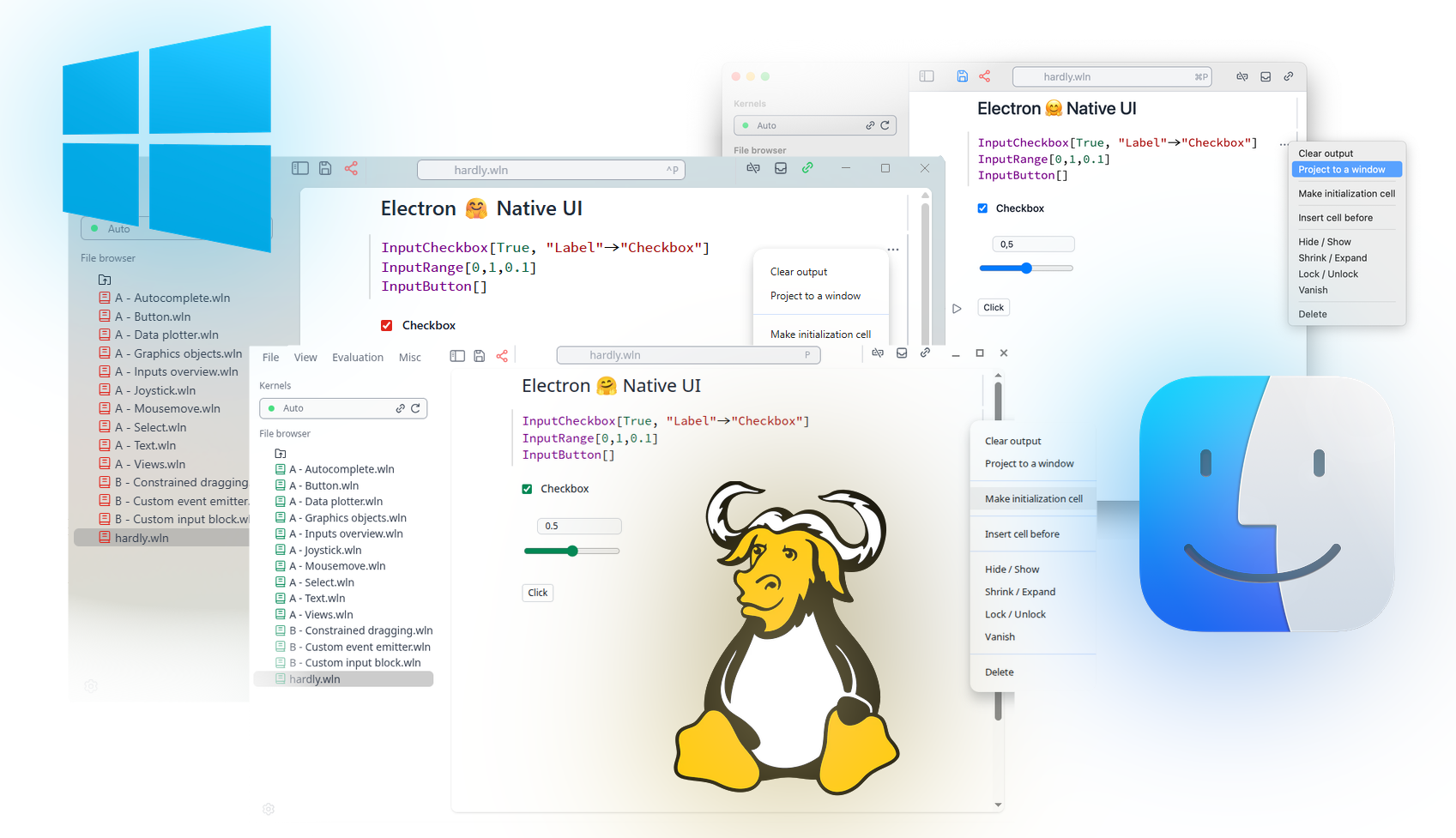
Even More Native UI
We have polished our GUI for all three platforms and eliminated our custom modal dialog windows. It now follows your system's accent color, and you can customize it from the settings menu:
Input, InputString
We reimplemented the oldest functions from Wolfram Language allowing blocking or non-blocking (InputAsync or InputStringAsync) interactive input from a user:
Plot[Evaluate[Input["Enter a function", (*SpB[*)Power[x(*|*),(*|*)3](*]SpB*)]], {x,-1,1}]
(*VB[*)(FrontEndRef["bc8bd1f4-41c6-4ef7-88e3-9517976fdd6e"])(*,*)(*"1:eJxTTMoPSmNkYGAoZgESHvk5KRCeEJBwK8rPK3HNS3GtSE0uLUlMykkNVgEKJyVbJKUYppnomhgmm+mapKaZ61pYpBrrWpoamluam6WlpJilAgCNJhXy"*)(*]VB*)
ProgressIndicator
A handy easy expression for making progress bars
ProgressIndicator[0.5, {0,1}]
(*VB[*)(ProgressIndicator[0.5, {0, 1}])(*,*)(*"1:eJxTTMoPSmNkYGAoZgESHvk5KWlMIJ4gkAgoyk8vSi0u9sxLyUxOLMkvKmIAgwf2EDUgHT6ZxSWZIMFMkCEArfQQZw=="*)(*]VB*)
You can supply a dynamic symbol to it as well
x = 0.0;
ProgressIndicator[x // Offload, {0,1}]
Do[x -= 0.1(x - 1.0); Pause[0.1], {30}];
"Done!"
Improved Text in Graphics
For certain cases Text is used in Wolfram Language can be used as an inset with symbolic numeric expressions like:
Graphics[{Disk[], White, Text[1/2, {0,0}, {0,0}]}, ImageSize->100]
Graphics[{Disk[], White, Text[Exp[2I + 1], {0,0}, {0,0}]}, ImageSize->100]
Graphics[{Disk[], White, Text[(*SqB[*)Sqrt[34](*]SqB*)/5, {0,0}, {0,0}]}, ImageSize->100]
(*VB[*)(Graphics[{Disk[{0, 0}], GrayLevel[1], Text[1/2, {0, 0}, {0, 0}]}, ImageSize -> 100])(*,*)(*"1:eJxTTMoPSmNkYGAoZgESHvk5KWlMIB4HkHAvSizIyEwuTmOGyftkFpcgVLtkFmdDVMPkMoE0A5iAqOKEmFLpk1qWmpMJEkKYFZJaUYKwKyixJDM/LxGiKBMkjNNkguJBpTmpYKs9cxPTU4Mzq1IzU4A8AI9pKhc="*)(*]VB*)
(*VB[*)(Graphics[{Disk[{0, 0}], GrayLevel[1], Text[E^(1 + 2*I), {0, 0}, {0, 0}]}, ImageSize -> 100])(*,*)(*"1:eJxTTMoPSmNkYGAoZgESHvk5KWlMIB4HkHAvSizIyEwuTmOGyftkFpcgVLtkFmdDVMPkMoE0A5iAqOKEmFLpk1qWmpMJEkKYFZJaUQLRzQokAvLLU4uKQSpcIYLsQMI5P7cgJ7UCrDETJIrTNoLiQaU5qWDneOYmpqcGZ1alZqYAeQDpYS1a"*)(*]VB*)
(*VB[*)(Graphics[{Disk[{0, 0}], GrayLevel[1], Text[Sqrt[34]/5, {0, 0}, {0, 0}]}, ImageSize -> 100])(*,*)(*"1:eJxTTMoPSmNkYGAoZgESHvk5KWlMIB4HkHAvSizIyEwuTmOGyftkFpcgVLtkFmdDVMPkMoE0A5iAqOKEmFLpk1qWmpMJEkKYFZJaUQLRzQriZeamFiOsDkosyczPS4ToyQQpQCgNyC9PLcpUgothqmeCy2FxGEHxoNKcVLDLPXMT01ODM6tSM1OAPACHwzVm"*)(*]VB*)
Dynamics is not possible at the moment for such expressions, but only for strings.
Here is a "natural" example for that in Graph.
transitionMatrix = {{7/10, 0, 3/10, 0}, {1/2, 0, 1/2, 0}, {0, 2/5, 0, 3/5}, {0, 1/5, 0, 4/5}};
mp = DiscreteMarkovProcess[2, transitionMatrix];
Graph[mp, EdgeLabels -> {e_ :> MarkovProcessProperties[mp, "TransitionMatrix"][[## & @@ e]]}]
(*VB[*)(CoffeeLiqueur`Extensions`Boxes`Workarounds`temporal$671908)(*,*)(*"1:eJxTTMoPSmNkYGAoZgESHvk5KRCeEJBwK8rPK3HNS3GtSE0uLUlMykkNVgEKpyUmGiUbGhjpmqclG+uaWBoZ6lompZjqmiSbmZmamBunWSYbAgCGdRVz"*)(*]VB*)
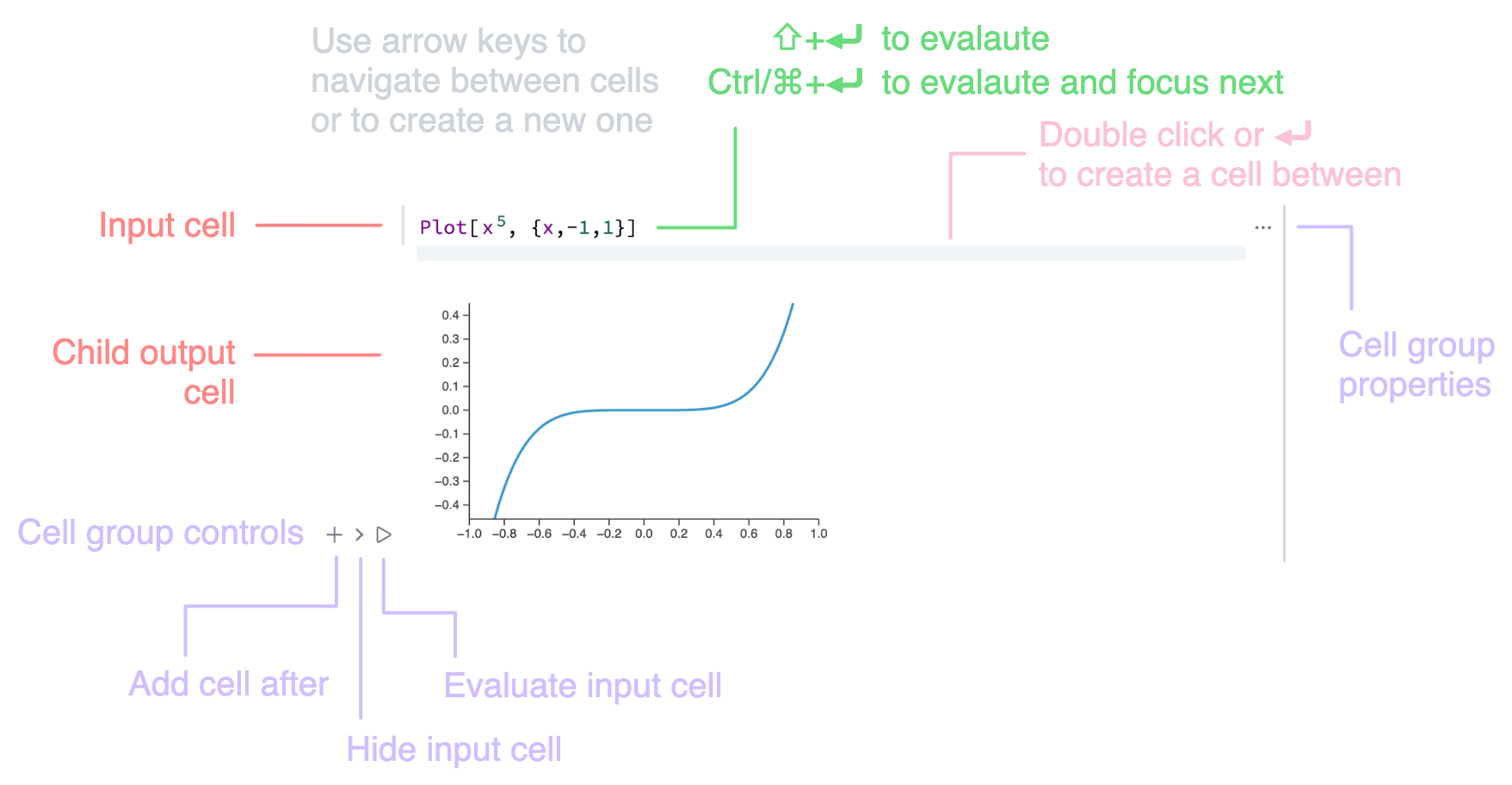
New shortcut
To evaluate the current cell and jump to the next one use Ctrl/Cmd-Enter
Other changes / improvements
- Code base refactor: removed ~1000 LOC
- Fixed bugs with
SystemOpen - Linux GTK errors fixes
- Minor issues with exports to HTML file
- Radicant styles
- Licenses update