Release notes *3.0.7*
docker run -it \
  -v ~/wljs:"/home/wljs/WLJS Notebooks" \
  -v ~/wljs/Licensing:/home/wljs/.WolframEngine/Licensing \
  -v ~/wljs/tmp:/tmp \
  -p 8000:3000 \
  --name wljs \
  ghcr.io/wljsteam/wljs-notebook:main
brew install --cask wljs-notebookTraditionalForm
We implemented TraditionalForm, which was missing from WLJS. Under the hood, it attempts to convert expressions to LaTeX and render them in the output.
Integrate[f[x], x] // TraditionalForm You can also use it for labels and plot legends.
Plot[Sin[x], {x, 0, 1}, PlotLegends->{Sin[x]//TraditionalForm}] Settings Hot Reload & Dark Mode Update
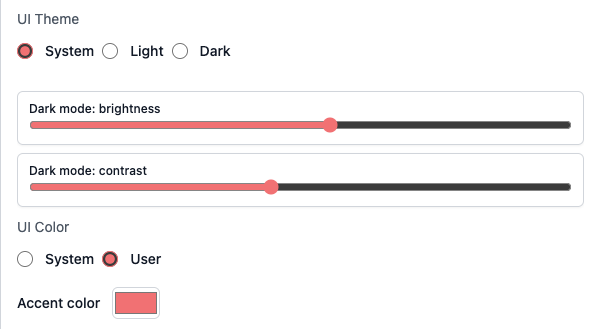
You no longer need to restart WLJS every time you change a setting, for the most part. Open notebooks automatically reload after a settings change.
In addition, we added contrast and brightness adjustments for dark mode, so you can tune it until it feels comfortable for your eyes.
Window Manager Refactor & Offscreen Rendering
We simplified and improved many parts of the codebase. Rasterize and many other system features no longer require open windows and now work seamlessly in the background. Most users may not notice a huge difference, but this makes future maintenance and advanced WLJS usage much better.
If you are using the WLJS desktop application, try:
Rasterize[Plot[x, {x,0,1}]] CellPrint no longer requires additional parameters when used without an evaluation context, such as inside a Button.
Button["Print", CellPrint[RandomColor[]]] CLI Update
You can use the wljs utility to inspect notebooks:
.sh
wljs focused
{
"Id": "008",
"Kernel": "002"
}
You can also run Wolfram Language code, similar to wolframscript. For example, here is an analogue of the ls or dir command:
.sh
wljs -c 'FileNames["*"]'
{"2.5.0.wln", "2.5.2.wln", "2.5.3.wln", "2.5.4.wln", "2.5.6.wln", "2.5.7.wln", "2.5.9.wln", "2.6.1.wln", "2.6.2.wln", "2.6.3.wln", "2.6.4.wln", "2.6.5.wln", "2.6.7.wln", "2.6.8.wln", "2.7.0.wln", "2.7.1.wln", "2.7.2.wln", "2.7.2 X1.wln", "2.7.3.wln", "2.7.4.wln", "2.7.5.wln", "2.7.6.wln", "2.7.8.wln", "2.7.9.wln", "2.8.0.wln", "2.8.1.wln", "2.8.2.wln", "2.8.3.wln", "2.8.5.wln", "2.8.7.wln", "2.8.8.wln", "2.8.9.wln", "2.9.1.wln", "2.9.2.wln", "3.0.0.wln", "3.0.1.wln", "3.0.2.wln", "3.0.3.wln", "3.0.4.wln", "3.0.7.wln", "3.0.7.wln", "attachments", ".DS_Store", ".iconized"}
Rasterize and WLJS-specific functions also work out of the box.
.sh
wljs -c 'Rasterize[TeXView[TeXForm[1/2]]]'
<<Image>>
MCP Update
With help from @Hachann, we significantly improved the tools for AI agents and reduced token consumption.
Disk and Circle Improvements
Our Disk and Circle graphics primitives now support multiple coordinates as their first argument, similar to Point and Line. For example:
pts = {{-1.,-1.}, {1.,1.}};
Graphics[{
  Disk[pts // Offload, 0.08], Red,
  Circle[pts // Offload, 0.11]
}, "Controls"->False]
(*VB[*)(Graphics[{Disk[Offload[pts], 0.08], RGBColor[1, 0, 0], Circle[Offload[pts], 0.11]}, "Controls" -> False])(*,*)(*"1:eJxTTMoPSmNkYGAoZgESHvk5KWlMIB4HkHAvSizIyEwuTmOGyftkFpdA5EE8l8zibIhediDhn5aWk5+YUgxSXFBSXFQtss79YdUWe4hukHlB7k7O+Tn5RZkgPZkMMAJiIBuQcM4sSs5JxW2kZkz/oa8ae+wRTggqzUkNBpntnJ9XUpSfU1zMCuS4JeYUpwIAslYw0A=="*)(*]VB*) Now try updating the points:
pts = Append[pts, RandomReal[{-1,1}, 2]]; This was already possible with FrontSubmit and by referencing the graphics canvas with FrontInstanceReference. Use that approach if you need to append or remove compound graphics primitives.
AF Update
The animation framework has been updated. It is more stable and now renders export animations fully offscreen at up to 2K resolution. It uses native Node.js I/O to write frames to disk and bypasses the Wolfram Kernel entirely.
Misc
- Improved
Short - Fixed encoding issues for
Text - Added missing binaries
- Improved
ZoomAt - Improved
MMAView,GeoGraphics, andTeXForm - Stability improvements
- WLW (Mini Apps) bug fixes