From a Photo to a Scanned Document
Let’s make something practical. You have a bunch of document photos, and you want to make them look like scans - ideally in a batch. Why use online services when your fellow Wolfram/WLJS can do the job?
Okay, you want to make it look like a scanned document from a picture.
img = (*VB[*)(FrontEndRef["acdfd97d-7781-4872-93f3-4543b7260b41"])(*,*)(*"1:eJxTTMoPSmNkYGAoZgESHvk5KRCeEJBwK8rPK3HNS3GtSE0uLUlMykkNVgEKJyanpKVYmqfomptbGOqaWJgb6VoapxnrmpiaGCeZG5kZJJkYAgCHihUi"*)(*]VB*); Naive approach
WL has some built-in ML image-segmentation functions; shall we just go with that?
HighlightImage[img, {Opacity[0.5], ImageBoundingBoxes[img]}, PlotRangeClipping->False, ImagePadding->10] (*VB[*)(FrontEndRef["76a7cc60-baa5-4df4-ad7c-d503a06a06e6"])(*,*)(*"1:eJxTTMoPSmNkYGAoZgESHvk5KRCeEJBwK8rPK3HNS3GtSE0uLUlMykkNVgEKm5slmicnmxnoJiUmmuqapKSZ6CammCfrppgaGCcamAFRqhkAkN4WIw=="*)(*]VB*) A book! We can use this bounding box to crop the image, so let's do that.
cropped = ImageCases[img, "book"] // First; With the help of EdgeDetect
ColorConvert[cropped, "Gray"] // EdgeDetect (*VB[*)(FrontEndRef["d3055b4a-9819-4976-89ff-fe9eadd4a38b"])(*,*)(*"1:eJxTTMoPSmNkYGAoZgESHvk5KRCeEJBwK8rPK3HNS3GtSE0uLUlMykkNVgEKpxgbmJommSTqWloYWuqaWJqb6VpYpqXppqVapiampJgkGlskAQB/jxXx"*)(*]VB*) We can try to locate the four corners of the image.
find4Corners[pts_] := {
  First @ MaximalBy[pts, -#[[1]] + #[[2]] &], (* 1st: Top-Left *)
  First @ MaximalBy[pts,  #[[1]] + #[[2]] &], (* 2nd: Top-Right *)
  First @ MaximalBy[pts,  #[[1]] - #[[2]] &], (* 3rd: Bottom-Right *)
  First @ MinimalBy[pts,  #[[1]] + #[[2]] &]  (* 4th: Bottom-Left *)
};
corners = find4Corners@PixelValuePositions[ColorConvert[cropped, "Gray"] // EdgeDetect , 1];
HighlightImage[cropped, {Yellow, Line[Append[corners, corners[[1]]]], Opacity[0.3], Disk[corners, Offset[{20,20}]]}]
(*VB[*)(FrontEndRef["a4aa8caf-11c4-44c9-914b-7df213b09e23"])(*,*)(*"1:eJxTTMoPSmNkYGAoZgESHvk5KRCeEJBwK8rPK3HNS3GtSE0uLUlMykkNVgEKJ5okJlokJ6bpGhomm+iamCRb6loamiTpmqekGRkaJxlYphoZAwCOzRXF"*)(*]VB*) Now we only need to apply a geometric transformation to the image—a "Perspective" class, to be specific. There is a special symbol for that, supplied with the current and target coordinates:
{w, h} = ImageDimensions[cropped];

(* 4 skewed corner coordinates from the scanned image *)
scannedCorners = corners;

(* Define where they SHOULD be in the final flattened image *)
targetCorners = {{0, h}, {w, h}, {w, 0}, {0, 0}};

(* Find the perspective transformation function *)
{error, transform} = FindGeometricTransform[targetCorners, scannedCorners,
  TransformationClass -> "Perspective"];

(* Apply the transformation to flatten the document *)
Row[{
  Labeled[ImageResize[img, {Automatic,h}], "Original"],
  Labeled[ImageForwardTransformation[cropped, transform, {w, h},
    DataRange -> {{0, w}, {0, h}}], "Transformed"]
}]
(*GB[*){{(*GB[*){{(*BB[*)((*VB[*)(FrontEndRef["e9877168-7ef5-44e7-a42c-3fa7a13fba9f"])(*,*)(*"1:eJxTTMoPSmNkYGAoZgESHvk5KRCeEJBwK8rPK3HNS3GtSE0uLUlMykkNVgEKp1pamJsbmlnomqemmeqamKSa6yaaGCXrGqclmicaGqclJVqmAQB/+RXp"*)(*]VB*))(*,*)(*"1:eJxTTMoPSmNkYGAoZgESHvk5KWnMIB4vkAjLTC13SU3OL0osyS8KBskHJOalpjHBVAeV5qQWcwIZjjmZ6Xm5qXklCDmfzOKSYjYgwxkonFpUzAFkOiUWp+ZkYpgggCQVkF+cWZKZn4eiHgAIiyhB"*)(*]BB*)(*VB[*)(**)(*,*)(*"1:eJxTTMoPSmNiYGAo5gUSYZmp5S6pyflFiSX5RcEsQBHPktRciDyIF1Sak1osAGS4pKYlluaUOCUWpwaXVOakBrMDBX0Sk1JzUlMAU+0Vnw=="*)(*]VB*)}(*||*),(*||*){"Original"(*VB[*)(**)(*,*)(*"1:eJxTTMoPSmNiYGAo5gUSYZmp5S6pyflFiSX5RcEsQBHPktRciDyIF1Sak1osAGS4pKYlluaUOCUWpwaXVOakBvMABX0Sk1JzUlPAFADFtBeE"*)(*]VB*)}}(*||*)(*1:eJxTTMoPSmNmYGAo5gUSYZmp5S6pyflFiSX5RcEsQBH3osyUNCaQPIgXVJqTWiwAFXbKr3DMyUzPy03NK0Eo8cksLkHVEMwOZDjn55Tm5hWnMaKoQ+EVs4HUAQ1LLUIzAMzILydPN9i9TonFqTmZeakB+cWZJZn5eajuzQSZBCYAfcc7lA==*)(*]GB*)(*|*),(*|*)(*GB[*){{(*BB[*)((*VB[*)(FrontEndRef["e7026af6-d15d-49ea-bab9-d48d0f7b0209"])(*,*)(*"1:eJxTTMoPSmNkYGAoZgESHvk5KRCeEJBwK8rPK3HNS3GtSE0uLUlMykkNVgEKp5obGJklppnpphiapuiaWKYm6iYlJlnqpphYpBikmScZGBlYAgCNkhYB"*)(*]VB*))(*,*)(*"1:eJxTTMoPSmNkYGAoZgESHvk5KWnMIB4vkAjLTC13SU3OL0osyS8KBskHJOalpjHBVAeV5qQWcwIZjjmZ6Xm5qXklCDmfzOKSYjYgwxkonFpUzAFkOiUWp+ZkYpgggCQVkF+cWZKZn4eiHgAIiyhB"*)(*]BB*)(*VB[*)(**)(*,*)(*"1:eJxTTMoPSmNiYGAo5gUSYZmp5S6pyflFiSX5RcEsQBHPktRciDyIF1Sak1osAGS4pKYlluaUOCUWpwaXVOakBrMDBX0Sk1JzUlMAU+0Vnw=="*)(*]VB*)}(*||*),(*||*){"Transformed"(*VB[*)(**)(*,*)(*"1:eJxTTMoPSmNiYGAo5gUSYZmp5S6pyflFiSX5RcEsQBHPktRciDyIF1Sak1osAGS4pKYlluaUOCUWpwaXVOakBvMABX0Sk1JzUlPAFADFtBeE"*)(*]VB*)}}(*||*)(*1:eJxTTMoPSmNmYGAo5gUSYZmp5S6pyflFiSX5RcEsQBH3osyUNCaQPIgXVJqTWiwAFXbKr3DMyUzPy03NK0Eo8cksLkHVEMwOZDjn55Tm5hWnMaKoQ+EVs4HUAQ1LLUIzAMzILydPN9i9TonFqTmZeakB+cWZJZn5eajuzQSZBCYAfcc7lA==*)(*]GB*)}}(*||*)(*1:eJxTTMoPSmNkYGAo5gUSYZmp5S6pyflFiSX5RcEsQBH3oswUAJ89CUc=*)(*]GB*) However, our naive EdgeDetect approach is very brittle if we have more complex geometry, artifacts, or foreign objects. Here is an example where it fails completely:
img = (*VB[*)(FrontEndRef["56c1fd27-21aa-4418-aa6b-868ccc4010b7"])(*,*)(*"1:eJxTTMoPSmNkYGAoZgESHvk5KRCeEJBwK8rPK3HNS3GtSE0uLUlMykkNVgEKm5olG6alGJnrGhkmJuqamBha6CYmmiXpWphZJCcnmxgYGiSZAwCDXRWS"*)(*]VB*);
{w, h} = ImageDimensions[img];

corners = find4Corners@PixelValuePositions[ColorConvert[img, "Gray"] // EdgeDetect , 1];
HighlightImage[img, {Yellow, Line[Append[corners, corners[[1]]]], Opacity[0.3], Disk[corners, Offset[{20,20}]]}]
(*VB[*)(FrontEndRef["efe81820-f982-4e73-bee9-a62b0d97d123"])(*,*)(*"1:eJxTTMoPSmNkYGAoZgESHvk5KRCeEJBwK8rPK3HNS3GtSE0uLUlMykkNVgEKp6alWhhaGBnopllaGOmapJob6yalplrqJpoZJRmkWJqnGBoZAwCIsBWw"*)(*]VB*) Hough-transform-like approach
Hough Transform is a popular line-detection algorithm that works by mapping points in an image to lines. Why lines? Most documents are rectangular-shaped or contain tables, rows, or columns. This is what ImageLines does, partially...
However, if you try to run ImageLines on a raw picture, you will probably generate a very large number of features. Therefore, we first smear out text and other small details, then find lines on an image already processed with EdgeDetect. This way, we are no longer looking for a global extremum.
GaussianFilter[ColorConvert[img, "Grayscale"], 4];
HighlightImage[img, {Yellow, lines = ImageLines[EdgeDetect[%]]}]
(*VB[*)(FrontEndRef["e93a63de-cce7-4e1c-9ba0-f21bcc8a92ca"])(*,*)(*"1:eJxTTMoPSmNkYGAoZgESHvk5KRCeEJBwK8rPK3HNS3GtSE0uLUlMykkNVgEKp1oaJ5oZp6TqJienmuuapBom61omJRrophkZJiUnWyRaGiUnAgCXnxa7"*)(*]VB*) This is already much better, and we can work with it. It also makes sense to generate a few of them using different threshold values. Here are our lines:
lines // Shallow {Line[{{265.29730250812463, 400.}, {284.4886956335601, 0.}}], Line[{{35.406611767349496, 400.}, {22.994185028855867, 0.}}], Line[{{0., 368.8376753507014}, {300., 368.8376753507014}}], Line[{{56.234224910770735, 400.}, {48.33691588454276, 0.}}], Line[{{0., 77.55870215025412}, {300., 80.94296704828275}}], <<20, Line[{{_Real, _Real}, {_Real, _Real}}]>>} In the next step, we select all lines that are close to either vertical or horizontal.
vertical = Select[
  lines /. Line -> Identity,
  With[{v = #[[2]] - #[[1]]},
    Abs[v[[2]]] > 3 Abs[v[[1]]]
  ] &
];

horizontal = Complement[lines /. Line -> Identity, vertical];

Graphics[{Red, Line@vertical, Blue, Line@horizontal},
  ImageSizeRaw->ImageDimensions[img]]
(*VB[*)(FrontEndRef["e45d6f76-3800-46b8-9390-ecd89d0f898d"])(*,*)(*"1:eJxTTMoPSmNkYGAoZgESHvk5KRCeEJBwK8rPK3HNS3GtSE0uLUlMykkNVgEKp5qYppilmZvpGlsYGOiamCVZ6FoaWxropianWFimGKRZWFqkAAB8WRVm"*)(*]VB*) Reject frame-border lines and require one candidate in each outer half of the photograph.
xmid[l_] := Mean[l[[All, 1]]];
ymid[l_] := Mean[l[[All, 2]]];

leftPool = Select[
      vertical,
      0.02 w < xmid[#] < 0.48 w &
];
rightPool = Select[
      vertical,
      0.52 w < xmid[#] < 0.98 w &
];
bottomPool = Select[
      horizontal,
      0.02 h < ymid[#] < 0.48 h &
];
topPool = Select[
      horizontal,
      0.52 h < ymid[#] < 0.98 h &
];
Now we pick the outermost set of lines from each pool:
left = First @ MinimalBy[leftPool, xmid];
right = First @ MaximalBy[rightPool, xmid];
bottom = First @ MinimalBy[bottomPool, ymid];
top = First @ MaximalBy[topPool, ymid];

Graphics[MapThread[List, {
  ColorData[97] /@ Range[4],
  Line/@{left, right, bottom, top}
}],
  ImageSizeRaw->ImageDimensions[img]]
(*VB[*)(Graphics[{{RGBColor[0.368417, 0.506779, 0.709798], Line[{{35.406611767349496, 400.}, {22.994185028855867, 0.}}]}, {RGBColor[0.880722, 0.611041, 0.142051], Line[{{265.29730250812463, 400.}, {284.4886956335601, 0.}}]}, {RGBColor[0.560181, 0.691569, 0.194885], Line[{{0., 21.442907441200433}, {300., 24.827172339229072}}]}, {RGBColor[0.922526, 0.385626, 0.209179], Line[{{0., 368.8376753507014}, {300., 368.8376753507014}}]}}, ImageSizeRaw -> {300, 400}])(*,*)(*"1:eJxTTMoPSmNkYGAoZgESHvk5KWlMIB4HkHAvSizIyEwuTmOByftkFpdA5OE8ZpjqIHcn5/yc/KKigmmTnqpMuW5fZDjt5fQO8wf2RcdbZniv2vbMHmGRT2ZeairIIBheWb7zFvcWRwcGMKh0uCH980XTPzMon4GBoK0+R6Kf39d7Y1/0r/rDraW9j+2LNs9ap75L7xA+WxeEuR04OKUAbmu2bfOmi8cLibeV4VnUFoa3D+2LStfu9Q9VfGZfJDlh772/H0/gsxUGUmTOJyYVmkJsO1DkwKXKOPHgZQsHgrZe2frNLrT1rX3RHf35ayTW3bAv0nBnXJRw7BQxtt7Y5yKXzlsOtxXGR9gaVJqTWswDZHjmJqanBmdWpQYllqM6KlMHaFHmBCABAL2KlTI="*)(*]VB*) Finding intersections is easy using computational geometry.
lineIntersection2D[l1_, l2_] := With[{
  i = RegionIntersection[InfiniteLine@l1, InfiniteLine@l2]
},
  If[MatchQ[i, _Point], Part[i,1], $Failed]
];

corners = {
    lineIntersection2D[left, top],
    lineIntersection2D[right, top],
    lineIntersection2D[right, bottom],
    lineIntersection2D[left, bottom]
};

HighlightImage[img,
  {Yellow, Opacity[.5], Disk[corners, Offset[{20,20}]],
  Polygon[corners]}
]
(*VB[*)(FrontEndRef["5d570b6a-9952-4c88-8675-c829afd4e091"])(*,*)(*"1:eJxTTMoPSmNkYGAoZgESHvk5KRCeEJBwK8rPK3HNS3GtSE0uLUlMykkNVgEKm6aYmhskmSXqWlqaGumaJFtY6FqYmZvqJlsYWSampZikGlgaAgB6EhUv"*)(*]VB*) You might think:
That's it! We are done
However, this is only half the story. Do you remember the threshold we used for ImageLines? Me neither. We can generate many candidates based on the way we choose lines, including this one, for instance:
GaussianFilter[ColorConvert[img, "Grayscale"], 4];
lines = ImageLines[EdgeDetect[%], 0.01];
vertical = Select[
  lines /. Line -> Identity,
  With[{v = #[[2]] - #[[1]]},
    Abs[v[[2]]] > 3 Abs[v[[1]]]
  ] &
];
horizontal = Complement[lines /. Line -> Identity, vertical];
leftPool = Select[
      vertical,
      0.02 w < xmid[#] < 0.48 w &
];
rightPool = Select[
      vertical,
      0.52 w < xmid[#] < 0.98 w &
];
bottomPool = Select[
      horizontal,
      0.02 h < ymid[#] < 0.48 h &
];
topPool = Select[
      horizontal,
      0.52 h < ymid[#] < 0.98 h &
];
left = First @ MinimalBy[leftPool, xmid];
right = First @ MaximalBy[rightPool, xmid];
bottom = First @ MinimalBy[bottomPool, ymid];
top = First @ MaximalBy[topPool, ymid];
corners = {
    lineIntersection2D[left, top],
    lineIntersection2D[right, top],
    lineIntersection2D[right, bottom],
    lineIntersection2D[left, bottom]
};

HighlightImage[img,
  {Yellow, Opacity[.5], Disk[corners, Offset[{20,20}]],
  Polygon[corners]}
]
(*VB[*)(FrontEndRef["21ba0b82-f37f-414c-8c73-59f379d85b5e"])(*,*)(*"1:eJxTTMoPSmNkYGAoZgESHvk5KRCeEJBwK8rPK3HNS3GtSE0uLUlMykkNVgEKGxkmJRokWRjpphmbp+maGJok61okmxvrmloCBSxTLEyTTFMBgOoVgA=="*)(*]VB*) Acceptance Criteria or Decision Making
You have heard of so-called Bayes decision making. Just to make sure, the way we are going to implement the next part is not it. We craft a few tests or rules to filter out bad candidates. What might work:
- Total area of a region — not too small or too large
- Region lies within the original image boundaries
- Four sides of a region should be close in length
In the worst-case scenario, we reject everything and prompt the user to interactively select all four points. Let's test one of our candidates:
areaFraction = Abs[Area[Polygon[corners]]]/(w h);
convexArea = Area[ConvexHullMesh[corners]]/(w h);
lengths = Norm[#[[2]] - #[[1]]] & /@
    Partition[Append[corners, First[corners]], 2, 1];

inside = And @@ Flatten[
    ({-0.04 w <= #[[1]] <= 1.04 w,
       -0.04 h <= #[[2]] <= 1.04 h} &) /@ corners
];

<|
  "InsideQ" -> inside,
  "AreaFraction" -> areaFraction,
  "ConvexAreaFraction" -> convexArea,
  "MinLength" -> Min[lengths],
  "MaxLength" -> Max[lengths]
|> // TableView
(*VB[*)(FrontEndRef["a12cb89e-ec02-4160-b2c9-47b32109bb10"])(*,*)(*"1:eJxTTMoPSmNkYGAoZgESHvk5KRCeEJBwK8rPK3HNS3GtSE0uLUlMykkNVgEKJxoaJSdZWKbqpiYbGOmaGJoZ6CYZJVvqmpgnGRsZGlgmJRkaAACFSBVY"*)(*]VB*) Many things go wrong here; at least it already lies outside the main image, which is a 🚩.
Batch processing
The main idea of automation is to create a pipeline. This part is rather boring, since we only need to pack it into isolated functions and handle some edge cases. The main idea of automation is to create pipeline. This part is rather boring, since we only need to pack it into an isolated functions and handle some edge cases.
lineIntersection2D[l1_, l2_] := With[{
  i = RegionIntersection[InfiniteLine@l1, InfiniteLine@l2]
},
  If[MatchQ[i, _Point], Part[i,1], $Failed]
];

(* Detect four outer page lines after blur suppresses text and table details. *)
houghPageCorners[image_Image] := Module[
  {im, edge, w, h, thresholds, chosen = Missing["NotFound"],
   lines, vertical, horizontal, leftPool, rightPool, bottomPool,
   topPool, xmid, ymid, left, right, bottom, top, corners,
   areaFraction, convexArea, lengths, inside, ok, confidence},

  im = ImageResize[image, 320];
  {w, h} = ImageDimensions[im];

  edge = EdgeDetect[
    GaussianFilter[ColorConvert[im, "Grayscale"], 4],
    2
  ];

  (* Lower thresholds expose faint paper edges. Geometry checks below
     prevent weak interior lines from being accepted as a page. *)
  thresholds = {0.12, 0.10, 0.08};

  Do[
    lines = Cases[
      ImageLines[edge, threshold],
      Line[p_] :> p
    ];

    vertical = Select[
      lines,
      With[{v = #[[2]] - #[[1]]},
        Abs[v[[2]]] > 3 Abs[v[[1]]]
      ] &
    ];

    horizontal = Select[
      lines,
      With[{v = #[[2]] - #[[1]]},
        Abs[v[[1]]] > 3 Abs[v[[2]]]
      ] &
    ];

    xmid[l_] := Mean[l[[All, 1]]];
    ymid[l_] := Mean[l[[All, 2]]];

    (* Reject frame-border lines and require one candidate in each
       outer half of the photograph. *)
    leftPool = Select[
      vertical,
      0.02 w < xmid[#] < 0.48 w &
    ];
    rightPool = Select[
      vertical,
      0.52 w < xmid[#] < 0.98 w &
    ];
    bottomPool = Select[
      horizontal,
      0.02 h < ymid[#] < 0.48 h &
    ];
    topPool = Select[
      horizontal,
      0.52 h < ymid[#] < 0.98 h &
    ];

    If[
      Min[Length /@ {leftPool, rightPool, bottomPool, topPool}] >= 1,
      chosen = <|
        "Threshold" -> threshold,
        "Lines" -> lines,
        "LeftPool" -> leftPool,
        "RightPool" -> rightPool,
        "BottomPool" -> bottomPool,
        "TopPool" -> topPool
      |>;
      Break[]
    ],
    {threshold, thresholds}
  ];

  If[
    MissingQ[chosen],
    Return[
      <|
        "Success" -> False,
        "Reason" -> "four supported outer lines were not found"
      |>
    ]
  ];

  (* From the filtered candidates, use the four outermost supported
     lines. Intersections are more stable than extrema of all pixels. *)
  left = First @ MinimalBy[chosen["LeftPool"], xmid];
  right = First @ MaximalBy[chosen["RightPool"], xmid];
  bottom = First @ MinimalBy[chosen["BottomPool"], ymid];
  top = First @ MaximalBy[chosen["TopPool"], ymid];

  corners = {
    lineIntersection2D[left, top],
    lineIntersection2D[right, top],
    lineIntersection2D[right, bottom],
    lineIntersection2D[left, bottom]
  };

  If[
    MemberQ[corners, $Failed],
    Return[
      <|
        "Success" -> False,
        "Reason" -> "parallel boundary lines"
      |>
    ]
  ];

  areaFraction = Abs[Area[Polygon[corners]]]/(w h);
  convexArea = Area[ConvexHullMesh[corners]]/(w h);
  lengths = Norm[#[[2]] - #[[1]]] & /@
    Partition[Append[corners, First[corners]], 2, 1];

  inside = And @@ Flatten[
    ({-0.04 w <= #[[1]] <= 1.04 w,
       -0.04 h <= #[[2]] <= 1.04 h} &) /@ corners
  ];

  (* Independent acceptance tests. A failed detection returns the
     original image instead of applying a destructive-looking warp. *)
  ok = inside &&
    0.28 <= areaFraction <= 0.92 &&
    Abs[convexArea - areaFraction] < 0.02 &&
    Min[lengths] > 0.28 Min[w, h] &&
    Max[lengths]/Min[lengths] < 4.5;

  confidence = Clip[
    0.55 Rescale[areaFraction, {0.28, 0.75}] +
    0.25 Min[1, Length[chosen["Lines"]]/18] +
    0.20 Rescale[chosen["Threshold"], {0.08, 0.12}],
    {0, 1}
  ];

  <|
    "Success" -> TrueQ[ok],
    "Reason" -> If[TrueQ[ok], "ok", "geometry validation"],
    "Preview" -> im,
    "Corners" -> corners,
    "BoundaryLines" -> {left, right, bottom, top},
    "Threshold" -> chosen["Threshold"],
    "AreaFraction" -> areaFraction,
    "Confidence" -> confidence,
    "SideLengths" -> lengths
  |>
];

(* Visual inspection helper: detected lines in yellow, corners in red. *)
pageCornerDiagnostic[image_Image] := Module[
  {d = houghPageCorners[image]},

  If[
    TrueQ[d["Success"]],
    HighlightImage[
      d["Preview"],
      {
        Directive[Yellow, Thick],
        Line /@ d["BoundaryLines"],
        Directive[Red, PointSize[0.018]],
        Point[d["Corners"]]
      }
    ],
    d
  ]
];

analyzeImage[i_] :=
  Module[
    {d, preview, scale, sourceCorners, sideLengths, outSize,
     targetCorners, error, transform, previewDims},

    d = houghPageCorners[i];
    preview = d["Preview"];

    previewDims = ImageDimensions[preview];

    (* Safe fallback: do not warp when the four-edge model is dubious. *)
    If[!TrueQ[d["Success"]],
      d = Join[d, <|
       "Corners" -> ((previewDims #) &/@ {
        {0.2, 0.8},
        {0.8, 0.8},
        {0.8, 0.2},
        {0.2, 0.2}}),
       "BoundaryLines" -> {{
        (previewDims #) &/@ {{0.1, 0.9}, {0.1, 0.1}},
        (previewDims #) &/@ {{0.9, 0.9}, {0.9, 0.1}},
        (previewDims #) &/@ {{0.1, 0.1}, {0.9, 0.1}},
        (previewDims #) &/@ {{0.1, 0.9}, {0.9, 0.9}}
       }}
      |>];
    ];


    scale = N[ImageDimensions[i]/previewDims];

    Join[d, <|"SourceImage" -> i, "Scale" -> scale|>]
];

unwrapImage[d_] :=
  Module[
    {i, scale, sourceCorners, sideLengths, outSize,
     targetCorners, error, transform},

    scale = d["Scale"];

    sourceCorners = (# scale) & /@ d["Corners"];

    (* Preserve resolution using measured opposing side lengths. *)
    sideLengths = Norm[#[[2]] - #[[1]]] & /@
      Partition[Append[sourceCorners, First[sourceCorners]], 2, 1];

    outSize = Round @ {
      Mean[sideLengths[[{1, 3}]]],
      Mean[sideLengths[[{2, 4}]]]
    };

    targetCorners = {
      {0, outSize[[2]]},
      {outSize[[1]], outSize[[2]]},
      {outSize[[1]], 0},
      {0, 0}
    };

    {error, transform} = FindGeometricTransform[
      targetCorners,
      sourceCorners,
      TransformationClass -> "Perspective"
    ];

    ImageForwardTransformation[
      d["SourceImage"],
      transform,
      outSize,
      DataRange -> Full,
      PlotRange -> {{0, outSize[[1]]}, {0, outSize[[2]]}}
    ]
];
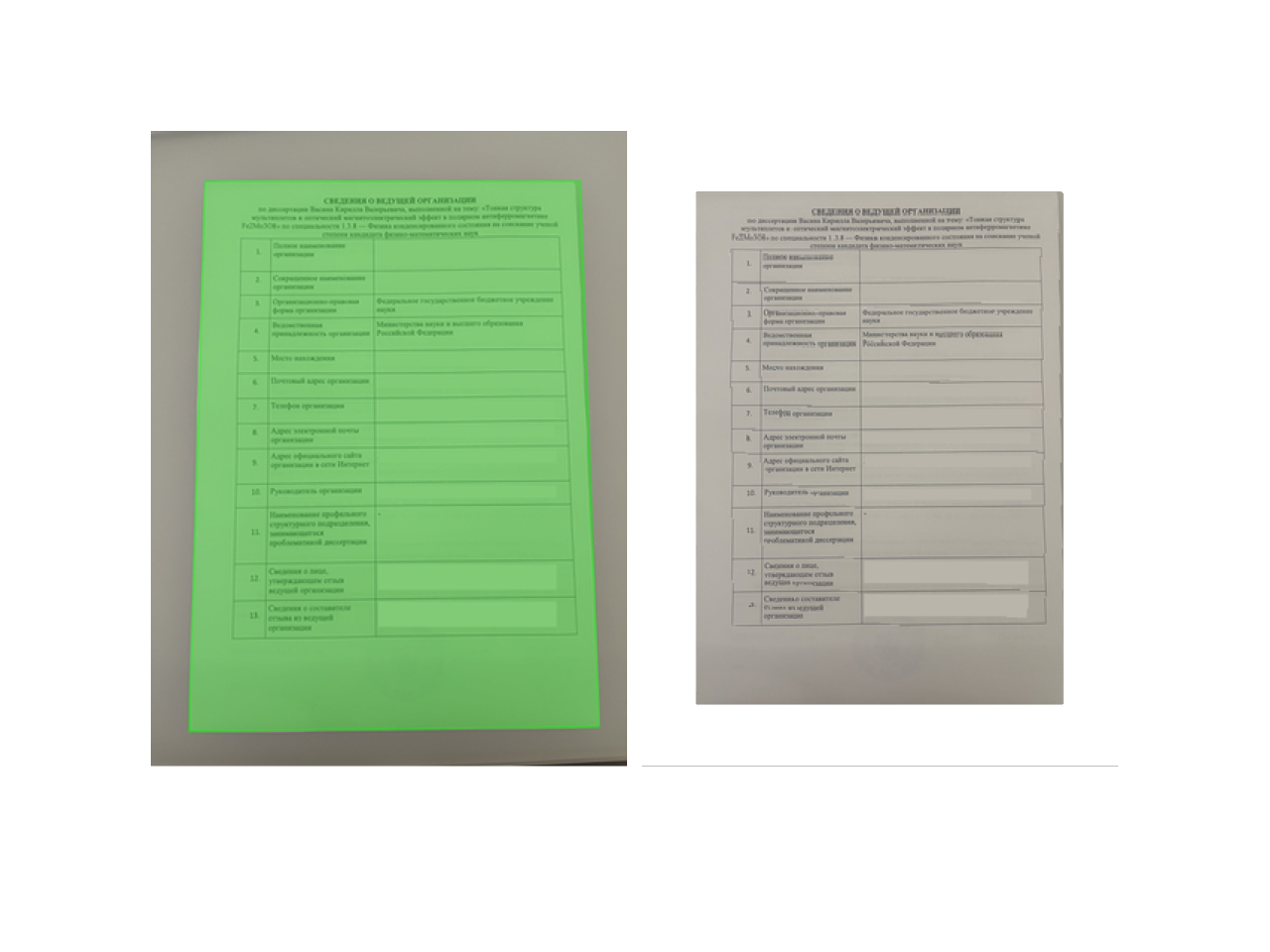
This cell above contains all the necessary parts, and you do not need to evaluate anything else to try it. I guess this example is rather self-explanatory.
With[{props = analyzeImage[img]},
 Row[{
  Labeled[HighlightImage[props["Preview"], {
    Opacity[.3], Green,
    Polygon[props["Corners"]]
  }], "Original"],
  Labeled[ImageCrop[
    analyzeImage[img]//unwrapImage,
    ImageDimensions[props["Preview"]]
  ], "Transformed"]
 }]
]
(*GB[*){{(*GB[*){{(*BB[*)((*VB[*)(FrontEndRef["3e5249d4-0cea-4a74-ab84-542abc70b487"])(*,*)(*"1:eJxTTMoPSmNkYGAoZgESHvk5KRCeEJBwK8rPK3HNS3GtSE0uLUlMykkNVgEKG6eaGplYppjoGiSnJuqaJJqb6CYmWZjompoYJSYlmxskmViYAwCEXhWc"*)(*]VB*))(*,*)(*"1:eJxTTMoPSmNkYGAoZgESHvk5KWnMIB4vkAjLTC13SU3OL0osyS8KBskHJOalpjHBVAeV5qQWcwIZjjmZ6Xm5qXklCDmfzOKSYjYgwxkonFpUzAFkOiUWp+ZkYpgggCQVkF+cWZKZn4eiHgAIiyhB"*)(*]BB*)(*VB[*)(**)(*,*)(*"1:eJxTTMoPSmNiYGAo5gUSYZmp5S6pyflFiSX5RcEsQBHPktRciDyIF1Sak1osAGS4pKYlluaUOCUWpwaXVOakBrMDBX0Sk1JzUlMAU+0Vnw=="*)(*]VB*)}(*||*),(*||*){"Original"(*VB[*)(**)(*,*)(*"1:eJxTTMoPSmNiYGAo5gUSYZmp5S6pyflFiSX5RcEsQBHPktRciDyIF1Sak1osAGS4pKYlluaUOCUWpwaXVOakBvMABX0Sk1JzUlPAFADFtBeE"*)(*]VB*)}}(*||*)(*1:eJxTTMoPSmNmYGAo5gUSYZmp5S6pyflFiSX5RcEsQBH3osyUNCaQPIgXVJqTWiwAFXbKr3DMyUzPy03NK0Eo8cksLkHVEMwOZDjn55Tm5hWnMaKoQ+EVs4HUAQ1LLUIzAMzILydPN9i9TonFqTmZeakB+cWZJZn5eajuzQSZBCYAfcc7lA==*)(*]GB*)(*|*),(*|*)(*GB[*){{(*BB[*)((*VB[*)(FrontEndRef["2e9b5f4b-f2a3-4662-b2f1-b30ca22f1971"])(*,*)(*"1:eJxTTMoPSmNkYGAoZgESHvk5KRCeEJBwK8rPK3HNS3GtSE0uLUlMykkNVgEKG6VaJpmmmSTpphklGuuamJkZ6SYZpRnqJhkbJCcaAVmW5oYAiNoVlA=="*)(*]VB*))(*,*)(*"1:eJxTTMoPSmNkYGAoZgESHvk5KWnMIB4vkAjLTC13SU3OL0osyS8KBskHJOalpjHBVAeV5qQWcwIZjjmZ6Xm5qXklCDmfzOKSYjYgwxkonFpUzAFkOiUWp+ZkYpgggCQVkF+cWZKZn4eiHgAIiyhB"*)(*]BB*)(*VB[*)(**)(*,*)(*"1:eJxTTMoPSmNiYGAo5gUSYZmp5S6pyflFiSX5RcEsQBHPktRciDyIF1Sak1osAGS4pKYlluaUOCUWpwaXVOakBrMDBX0Sk1JzUlMAU+0Vnw=="*)(*]VB*)}(*||*),(*||*){"Transformed"(*VB[*)(**)(*,*)(*"1:eJxTTMoPSmNiYGAo5gUSYZmp5S6pyflFiSX5RcEsQBHPktRciDyIF1Sak1osAGS4pKYlluaUOCUWpwaXVOakBvMABX0Sk1JzUlPAFADFtBeE"*)(*]VB*)}}(*||*)(*1:eJxTTMoPSmNmYGAo5gUSYZmp5S6pyflFiSX5RcEsQBH3osyUNCaQPIgXVJqTWiwAFXbKr3DMyUzPy03NK0Eo8cksLkHVEMwOZDjn55Tm5hWnMaKoQ+EVs4HUAQ1LLUIzAMzILydPN9i9TonFqTmZeakB+cWZJZn5eajuzQSZBCYAfcc7lA==*)(*]GB*)}}(*||*)(*1:eJxTTMoPSmNkYGAo5gUSYZmp5S6pyflFiSX5RcEsQBH3oswUAJ89CUc=*)(*]GB*) User intervention
So far, everything was rather static. Our approach is still the least advanced among what is possible using ML and clever computer-vision algorithms. Therefore, we should give the user an option to map corners manually. So far everything was rather static. Our approach is still the least advanced among from what is possible using ML and clever computer vision alrogythm. Therfore, we should give a user an option to map corners manually.
makePreview[data_, p_Promise] := Module[{lines, corners, handle},
  lines = data["BoundaryLines"];
  corners = data["Corners"];

  handle[line_][xy_] := With[{},
    corners[[line]] = xy;
    lines = {
      {corners[[1]], corners[[2]]},
      {corners[[4]], corners[[3]]},
      {corners[[1]], corners[[4]]},
      {corners[[2]], corners[[3]]}
    }[[{3, 4, 2, 1}]];
  ];


  Column[{HighlightImage[data["Preview"], {
    {Yellow, Line[lines//Offload], Opacity[0.3],
      Table[
        With[{i=i}, EventHandler[Disk[corners[[i]], Offset[{20,20}]], {
          "drag" -> handle[i]
        }]],
        {i, 4}
      ]
    }
  }], Button["Continue", Beep[]; With[{d = Join[data, <|"Corners" -> corners|>]},
    ClearAll[handle, lines, corners];
    EventFire[p, Resolve, d]
  ]]}]
]
Here it is rather easy. We accept the association generated by analyzeImage, take the initial four corners, and make them draggable. On drag, handle is called with updated coordinates, which update line segments as well as the stored association. We avoid Module here to prevent symbols from being garbage-collected. Try it out on img.
p = Promise[];
Then[p, Print["Done!"]&];

d = analyzeImage[img];

makePreview[d, p]
(*GB[*){{(*VB[*)(FrontEndRef["35077e63-9329-48c9-96c6-a936701d7681"])(*,*)(*"1:eJxTTMoPSmNkYGAoZgESHvk5KRCeEJBwK8rPK3HNS3GtSE0uLUlMykkNVgEKG5samJunmhnrWhobWeqaWCRb6lqaJZvpJloam5kbGKaYm1kYAgBtRBRz"*)(*]VB*)}(*||*),(*||*){(*VB[*)(EventObject[<|"Id" -> "517a5eb7-6166-498f-98e1-6583bbc9eab5", "Initial" -> False, "View" -> "e3874a1e-1b9f-428c-ac7f-7703dc526be7"|>])(*,*)(*"1:eJxTTMoPSmNkYGAoZgESHvk5KRCeEJBwK8rPK3HNS3GtSE0uLUlMykkNVgEKpxpbmJskGqbqGiZZpumaGFkk6yYmm6fpmpsbGKckmxqZJaWaAwCHbxXc"*)(*]VB*)}}(*||*)(*1:eJxTTMoPSmNiYGAo5gUSYZmp5S6pyflFiSX5RcEsQBH3oswUiDyIF1Sak1osABV2yq9wzMlMz8tNzStJY4Qp8cksLkHVEMwOZDjn55Tm5hWjqUPhQRipaSUAIwUhsg==*)(*]GB*) Try to drag these 4 corners
Or you can also project it to a new window and close it when you are done:
p = Promise[];
Then[p, NotebookClose[win]&];

win = CreateWindow[makePreview[d, p], WindowSize->1.4ImageDimensions[img]];
Bonus 1: Images to PDF
Unfortunately, WL does not provide an easy way to merge multiple images into a multi-page PDF document. For this reason, we wrote a library or package Willow based on the PDFio C library. You can clone it and load it using: Unfortunately WL does not provide an easy way to merge multiple images into a multi-page PDF document. For this reason we wrote a library or a package Willow based on PDFio C library. You can clone it and load using:
PacletDirectoryLoad%5B%22path%2Fto%2Fwillow%22%5D%3B%0A%3C%3CWillow%60 Or alternatively, if you are an LPM or WLJS Notebook user:
LPMRepositories%5B%7B%22Github%22%20-%3E%20%22https%3A%2F%2Fgithub.com%2FWLJSTeam%2FWillow%22%7D%5D%3B%0A%3C%3CWillow%60%3B These symbols are available at the moment:
%3F%22Willow%60%2A%22 (*VB[*)(FrontEndRef["e1f1efe4-2716-4000-83dc-166a45f6d758"])(*,*)(*"1:eJxTTMoPSmNkYGAoZgESHvk5KRCeEJBwK8rPK3HNS3GtSE0uLUlMykkNVgEKpxqmGaampZroGpkbmumaGBgY6FoYpyTrGpqZJZqYppmlmJtaAACCPhVF"*)(*]VB*) Then we can convert all our images into a single PDF like this:
ImagesToPDF["test.pdf", {img, img, img}]; Bonus 2: Mini app
If you are reading this notebook from a web page, it might not be clear that this notebook has multiple cells marked as initialization cells and that the whole notebook itself is a mini app. Or let's say you can just go to the
However, for a mini app to work, we need to define a few more initialization cells below. Like this one, to automatically create and dispose of new windows:
proceedWithData[data_] := With[{d = Unique[], promise = Promise[]},
 d = data;
 With[{p = Promise[]}, {win = CreateWindow[makePreview[d, p], WindowSize->(1.4 ImageDimensions[d["Preview"]])]},

  Then[p, Function[result,
    d = result;
    NotebookClose[win];
    EventFire[promise, Resolve, d];
    ClearAll[d];
  ]];
  promise
]]
One for a progress bar to indicate that something is working:
createProgressBar[] := With[{bar = Unique[], handle = Unique[]},
  bar = 0.0;
  With[{win = CreateWindow[Deploy@Row[{
    ProgressIndicator[bar//Offload, {0,1}]
  }, Alignment->{Center, Center}, ImageSize->200], WindowSize->{260,80}]},
    handle["Cancel"] := (
      NotebookClose[win];
      ClearAll[bar, handle];
    );
    handle["Set", i_] := bar = i;
  ];
  handle
];
Async batch-processing logic and exporting:
normalizeSize[img_Image] := With[{s = img},
  With[{v = If[ImageDimensions[s][[1]] > ImageDimensions[s][[2]],
    (* rotate image if this one is in landscape *)
    ImageRotate[s], s
  ]},
    If[ImageDimensions[v][[1]] > 1280, ImageResize[v, 1280], v]
  ]
]

batchRun = AsyncFunction[paths, With[{
  loader = Unique[],
  data = Unique[],
  images = Unique[],
  path = Unique[]
},
  (* pause for a progress bar window *)
  loader = createProgressBar[];
  PauseAsync[300] // Await;

  data = Table[
    loader["Set", i/Length[paths]];
    paths[[i]] // Import // normalizeSize // analyzeImage, {i,Length[paths]}];

  loader["Cancel"];

  data = TableAsync[proceedWithData[data[[i]]] // Await, {i,Length[data]}] // Await;

  loader = createProgressBar[];
  PauseAsync[300] // Await;

  images = Table[
          loader["Set", i/Length[data]];
          ImageAdjust[unwrapImage[data[[i]]], 0.75], {i, Length[data]}];


  path = SystemDialogInputAsync["FileSave", {Null, {"Documents" -> {"*.pdf"}}}] // Await;

  If[StringQ[path],
    ExportImagesToPDF[path, images];
    loader["Cancel"];
    ClearAll[loader, data, images, path];
   ,
    loader["Cancel"];
    ClearAll[loader, data, images, path];
    Return[]
  ];
]];
Final output window with a single button styled with CSS. This input cell must be the last one in the notebook for it to export correctly as a mini app. For this reason...
Thanks for reading or using this notebook! See you.
.wlx

done[result_] := Then[result, Beep[]&];

With[{Btn = InputButton["Open files", "Style"->"width:100%;height: 4rem;"]},

  EventHandler[Btn, Function[Null,
    Then[SystemDialogInputAsync["OpenList"], Function[paths,
      If[MatchQ[paths, {__String | _String}],
        Select[paths,
          Function[file, MemberQ[{"jpg","png","bmp","tff","jpeg","heic"},
            FileExtension[file]//ToLowerCase]
          ]
        ] // batchRun // done;
      ]
  ]]]];

  <div class="p-2">
    <Btn/>
    <script type="module">
      resizeTo(200,150);
    </script>
  </div>
]